Projet Fil Rouge. First year of the engineering cycle, 2024 to 2025.
A real robot, driven from a web page
In spring 2025 a team of six built a real mobile robot. My part was what the operator touches: a web page that drives it over Bluetooth, shows what its camera sees and turns the position of a ball into commands that keep it centred. The semester before, with a classmate, I wrote a colour-ball detector in pure C.
In three lines
- Problem
- A real robot had to be driven from a phone or a laptop, by hand, by voice and by following a ball, over a Bluetooth link that a normal page reload cut every time.
- What I built
- A single-page web app with three views that drives the robot through the Web Bluetooth API, the Raspberry Pi’s camera stream inside the voice view, a rule that turns the ball’s image position into drive commands, and the timing of split voice commands: 2 s per metre, 4 s per quarter turn.
- Result
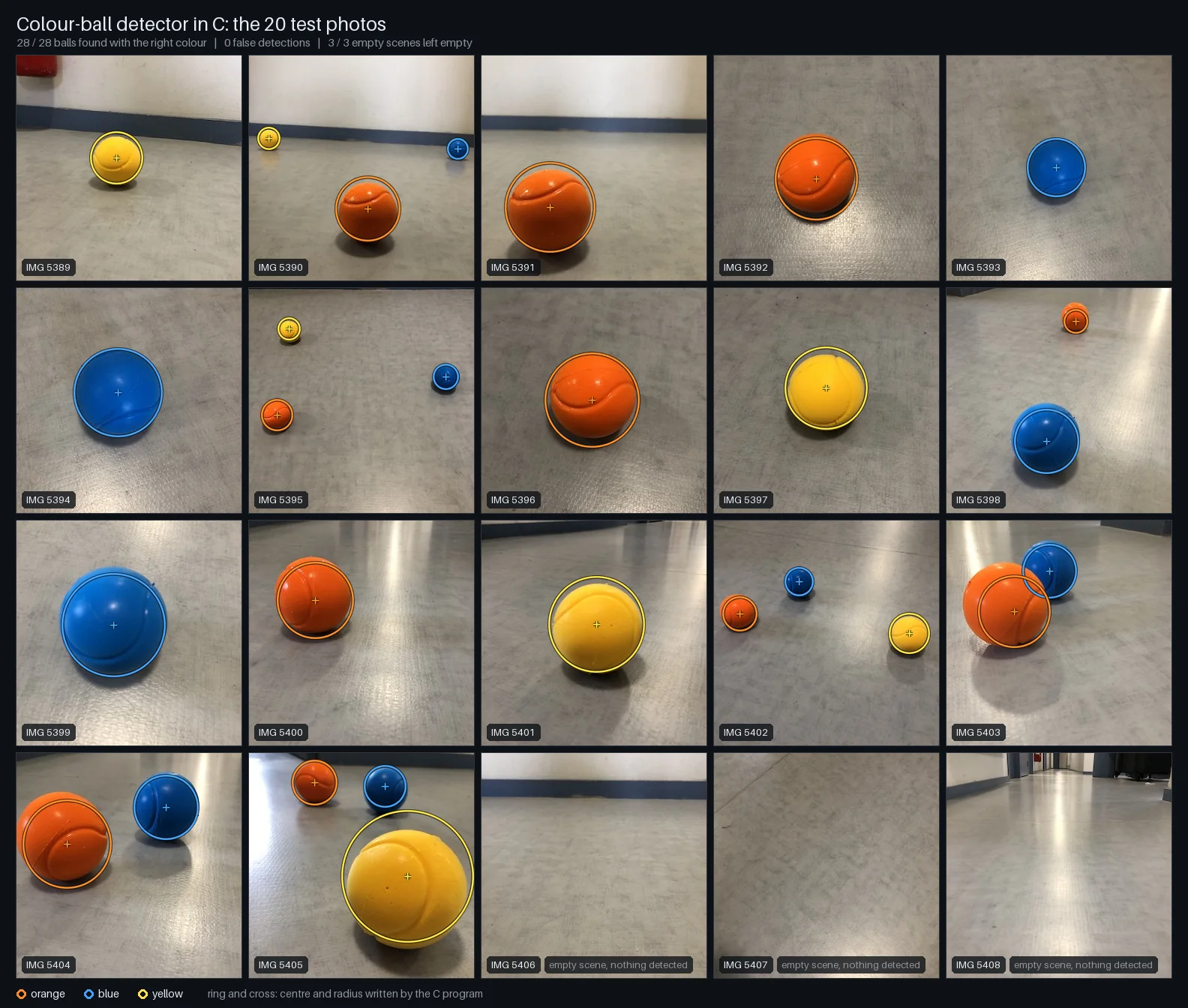
- A robot that the team showed driving from the page, by voice and following a ball, and mapping its surroundings. The C detector of the first half finds 28 of 28 balls on its 20 photos with no false detection, a score tuned on those photos that does not measure generalisation.
Context
The Projet Fil Rouge is the cross-disciplinary project of the first year of the engineering cycle at UPSSITECH, run over two semesters. The first half (semester 5, January 2025) was software written in C. In the second half (semester 6, spring 2025) each team had to move from a simulated world to a real robot that moves in a room, reacts to voice commands and detects objects with its sensors.
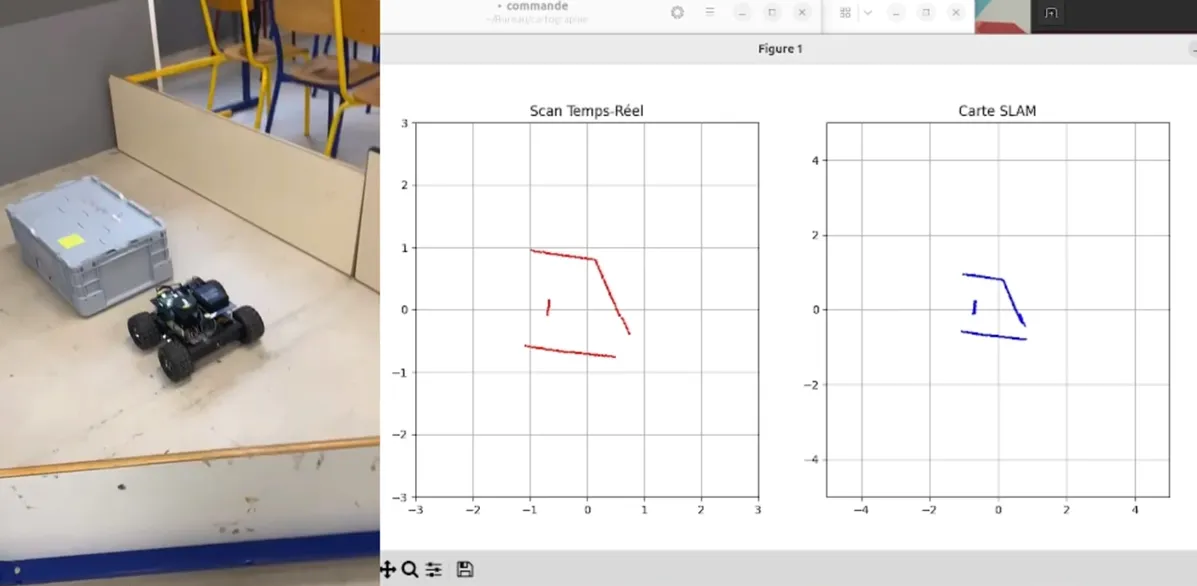
Our robot combines Arduino motor control, a Raspberry Pi camera, RPLiDAR mapping with ICP, voice commands, ball tracking and a web interface. We were six: my five teammates and me. The code, the report, the slides and the demo recordings are in the team repository PFR2.
What I built
Part 2, the page
A single-page app that never drops the link
The robot is driven over Bluetooth with the Web Bluetooth API, and a normal page reload cut that link every time. So the interface is one single-page app: a hub, a manual pad and a voice view swap in place without reloading. A permanent green or red dot says whether the link is up, and the connect button disappears once it is. The pad has four arrows and three large coloured buttons (faster, slower, automatic mode), sized and coloured for immediate use. The interface is built with Bootstrap 5.
Web Bluetooth works in Chrome and Edge on a desktop. On iOS, the report recommends a third-party browser app (Blueify).
Repository: PFR2team repository, Code/IHM
Part 2, the camera
The robot’s view inside the page
The Raspberry Pi processes the webcam video and serves it as an MJPEG stream, with the position of the detected ball, over the local Wi-Fi. In the voice view, as soon as a ball-following command is detected, my page shows the live stream.
The Raspberry Pi side, the OpenCV detection and its video server, is my teammates’ work.
Part 2, the ball
Keeping the ball centred
The page receives the ball’s (x, y) position and converts its horizontal coordinate into drive commands for the Arduino. When the ball is off the image centre line the robot turns towards it, when it is on the line the robot goes forward. With no ball in sight it turns to look for one, and if the camera cannot be reached it stops. The commands leave over the same Bluetooth link as the pad.
The rule is in the interface code of the team repository.
Part 2, the voice
Timing the spoken sequences
A teammate’s code turns a spoken French sentence into a list of commands, and an algorithm from a colleague splits it into steps (forward two metres, then a quarter turn to the right). I integrated that splitting, then computed and applied the delays between the commands: 2 s per metre and 4 s per quarter turn.
Following a ball from the web page
- 01Webcam and OpenCV on the Raspberry Picolour detection of the balls
While a ball is followed: the robot moves, and the camera sees the ball somewhere else
- 02MJPEG stream and ball positionserved over the local Wi-Fi
- 03Camera view in the web pagevoice view, shown when a ball-following command is detected
- 04Ball-centring rulethe ball’s horizontal position on the image: turn left, turn right or go forward
- 05Web Bluetooth writeone link for the pad, the voice view and the rule
- 06Arduino motor controlfour DC motors
Part 1, January 2025: a colour-ball detector in pure C
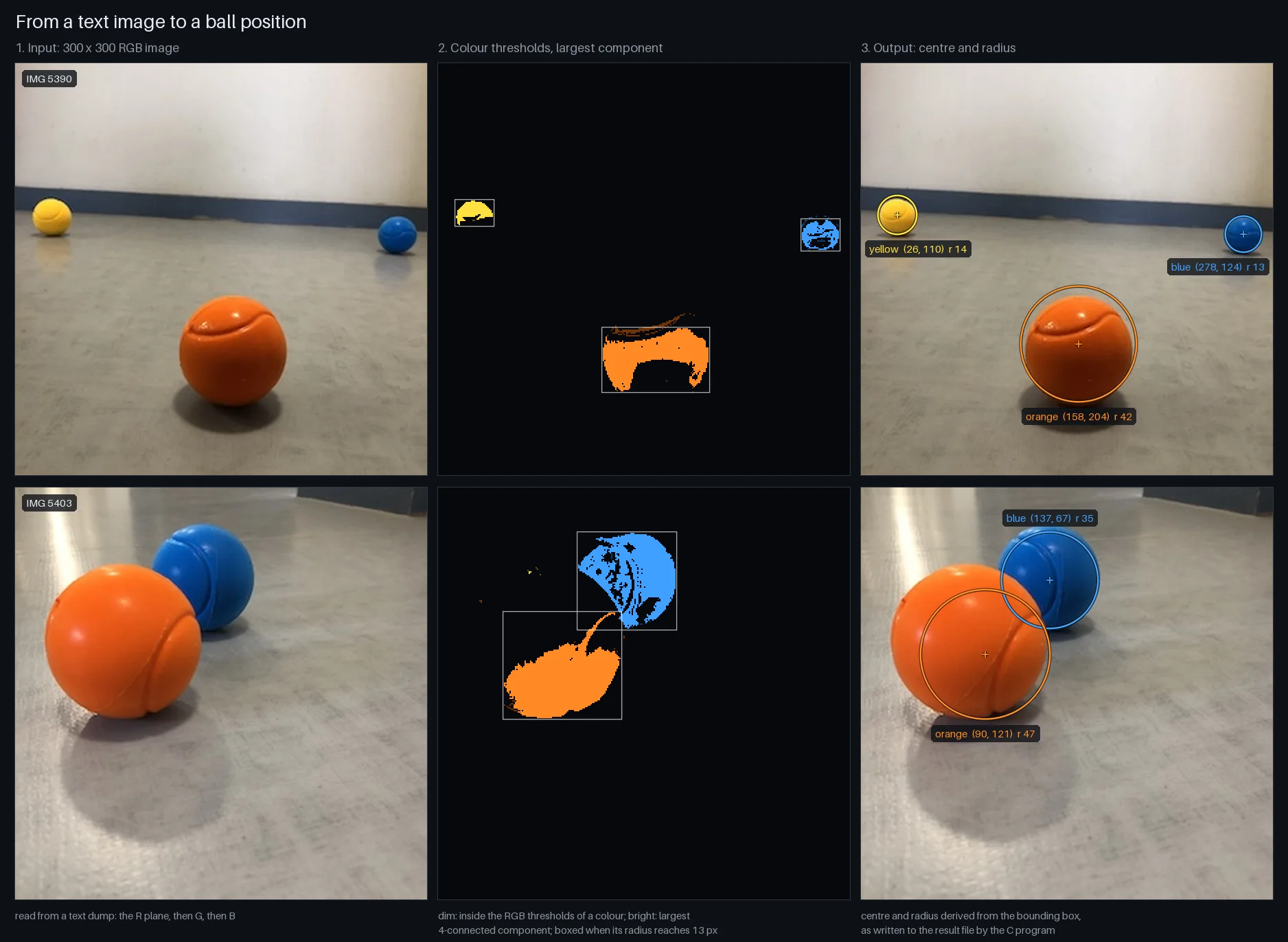
With a classmate I wrote the image-processing part of the first half of the project: a C11 program that finds orange, blue and yellow balls in a 300 × 300 RGB image and reports the centre and radius of each one, without any vision library. It reads the image as a text dump, segments each colour with fixed RGB thresholds, keeps the largest 4-connected blob of each colour and measures it through its bounding box.
By git blame, my part is the image parser and structure, the file reading and writing, the colour thresholds and mask construction, and the cluster list with its bounding box, centre and radius. My classmate wrote the RGB quantisation and the largest-component filter.
In October 2026 I cleaned the repository up, with an AI coding assistant: the tuned version used at the end of the project was brought in, the remaining bugs were fixed (a stack overflow in the recursive flood fill, memory leaks, a crash when removing a small blob), and tests, a labelled evaluation and the figures were added.
Results
Part 2 is a demonstration, not a benchmark
The robot was shown driving from the page in manual mode, from a spoken sentence and following a ball, and mapping with its LiDAR: the recordings are in the team repository. I have no measurement of my own to quote for it. The only numbers in my part are the timing rule: 2 s per metre and 4 s per quarter turn.
28 / 28
balls found with the right colour, centre inside the labelled ball, on the 20 test photos of part 1, with no false detection and the 3 empty scenes left empty. The thresholds and the corrections were tuned on these same photos: this shows consistency, not generalisation.
| What was measured | Value | How to read it |
|---|---|---|
| Centre error of the reported circle, median (maximum), over the 28 balls | 4.1 px (18.0 px) | The worst case is a ball seen from very close. Orange and yellow masks miss about half of the ball, always on the same side. |
| Orange balls, median centre error before and after the three empirical corrections | 11.0 px → 6.1 px | The corrections help on this set, which is presumably the one they were fitted on. |
| Overlap of the reported circle with the labelled one (IoU), median (minimum) | 0.85 (0.59) | The blue balls are located within a few pixels, the orange and yellow ones less well. |
| Run time per image, in a Linux container and on Windows | 7 ms, 40 ms | Start-up and parsing of the 1 MB text file included, on one laptop CPU, no GPU. |
| Checks of the test suite | 101 + 58 | 101 unit checks on the modules and 58 on the compiled program: the 20 photos against stored outputs, synthetic scenes and malformed inputs. |
What failed or is unfinished
0 / 7
yellow balls found when every pixel of the 20 photos is darkened to 70% (a simulated exposure change). The fixed RGB thresholds are tied to the exposure of those photos: a 10% change in either direction already loses a ball.
One ball per colour, and no shape check. Only the largest blob of each colour is reported, and any large enough blob of a known colour counts as a ball. The position is approximate.
The C detector never ran on the robot. On the robot, ball tracking is a separate Python program on the Raspberry Pi, written by my teammates with OpenCV after the idea of the part 1 detector. It follows two or three colours at most: the report notes that more makes it unstable, and that the webcam reacts to the lighting and mistakes a bright object for a ball.
The voice timing is open loop. The delays are durations, not measured distances: the robot had no odometry, so a metre is two seconds of driving and a quarter turn is four.
Web Bluetooth is not available everywhere. It works in Chrome and Edge on a desktop. On an iPhone the report recommends a third-party browser app.
I did not write the image processing of part 2. Unlike in part 1, the detection that feeds the ball-centring rule is my teammates’ work. My part starts at the ball’s coordinates.
Credits
The other parts of the robot are the work of my five teammates, as the individual sections of the team report say: voice recognition and the command filter (one teammate, who also contributed to the Arduino code and to the user interface), ball tracking on the Raspberry Pi and its video server (two teammates), LiDAR mapping with ICP (one teammate), Arduino code and sensor wiring (one teammate).
The robot, the demo recordings, the report and the slides belong to the team. The recordings on this page come from the team repository PFR2, which is hosted by a teammate.
Part 1 was written with a classmate. The October 2026 clean-up and the evaluation are mine, made with an AI coding assistant: those commits carry a Co-Authored-By trailer.